Marketing Research Report: Shape Every Campaign With Source-Backed Signals
A curated weekly report that surfaces the market signals most relevant to each campaign, traceable to a whitelisted source.


Ungrounded content is getting firms burned. In June 2026, KPMG pulled a flagship agentic-AI report and only five of its 45 sources were verified. With the speed at which companies are rushing generic AI into marketing, accuracy is the first thing to slip.
How can marketers trust AI tools to create accurate content at scale? When your marketing tool runs on research and every claim traces back to its source, then your campaign and every piece of content you generate from there holds up.
Why generic research tools miss your buyer
A mountain of data doesn't automatically turn into a useful brief. Most research tools sort information by what's new or getting the most attention. That means a widely shared post often gets pushed to the top, while a niche advisory that could have a real impact on your buyer gets buried. The problem is simple: those tools don't know who you're trying to reach.
Marketing Research Report in Magi was built with this exact intent:
It already has your market, ICP, and persona definitions.
Each weekly report filters and ranks what happened that week against those criteria.
The Research Agent pulls only from sources you whitelist, and every claim carries a citation back to one you approved.
It's a curated weekly report for marketing teams, built on market signals collected by the Research Agent from various sources like deep research, LinkedIn, internal context, scoped to each campaign.
Build your week’s content with the Marketing Research Report
Read it from your home screen
Start Monday and this week's report is already on your home feed. It shows the top-ranked signals for each of your campaigns so you start from a brief instead of searching the knowledge base yourself.
Share it with your team
Email the report to yourself or your team from within Magi, and everyone stays current on the same week of research. A demand gen lead and a founder each see what's ranked for their buyer.
Ranked according to criteria you set
The report surfaces the few marketing signals that matter most for each campaign, ranked against the market, ICP, and persona you defined, so you stop searching across sources and start shaping messaging.
Grounded in sources you trust
Every signal traces back to a source you whitelisted, so the research you read and the content you build on it, stands on something you can cite.
Configure it for any job
The Marketing Research report can be used for any type of weekly research your team needs because it’s driven by your campaigns.
In Magi, a campaign contains everything the report needs like the audience you care about, the sources you trust, and the streams you want it to monitor. Those streams can include industry research, LinkedIn voices, competitor activity, and internal context like Slack conversations, call recordings, and uploaded documents.
Research topics tell the report what to watch. Set the topics for each campaign, and it surfaces signals tied to those areas.
Whitelisted sources determine where those signals come from. You choose the sites, publications, and channels a campaign can pull from, and every signal links back to a source you've approved.
Briefs and messaging pillars shape how signals are interpreted. The campaign stores your positioning so when something relevant appears it's already connected to the angles and messages that matter to your team.
Personas determine who each signal matters to. The campaign includes your target audiences, and the report maps every signal to the people it's most relevant for making it easier to route insights to the right reader.
Create a campaign for a product launch, and the report follows how the market reacts. Set up another for your weekly newsletter, and it pulls forward the ideas, research, and conversations worth writing about.
Turn signal into content
A signal surfaced in the report can be the topic of your next draft in the same workspace, so the report feeds what you publish instead of stopping at a digest.
Components of Weekly Marketing Research Report
Campaign Research
It highlights the top signal from studies and reports across your industry relevant to each campaign. It also calls out which ICP and persona each signal is relevant for.
For instance, a new CISA advisory lands in the knowledge base. In your Security Vertical campaign scoped to a security buyer, it ranks at the top. In a Brand Awareness campaign scoped to a founder audience, it ranks low and stays out of the way.
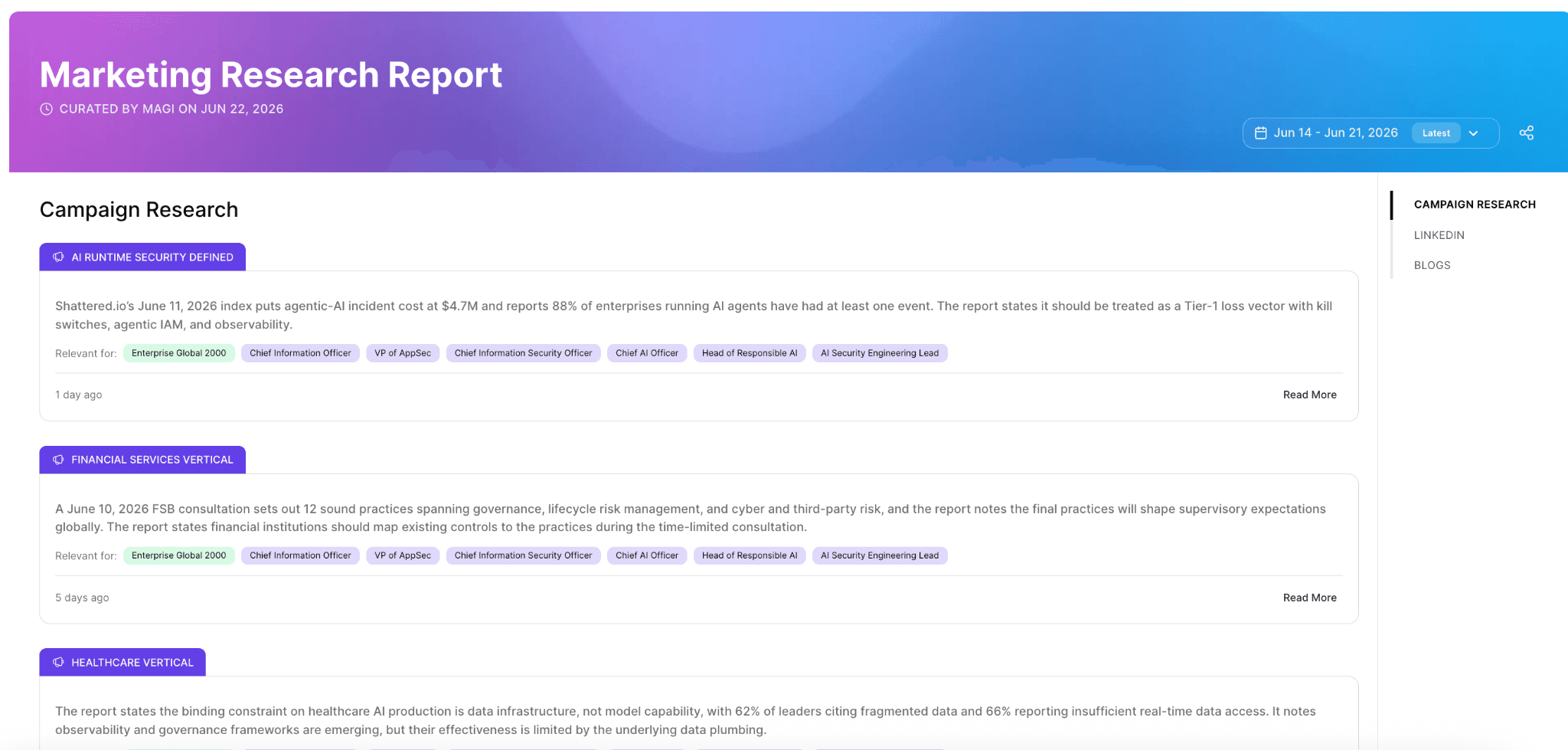
How this is used: You read the top signals for a campaign in play and shape that week's messaging around what the market is actually saying to your buyer. You can email the report to yourself or your team from within Magi, so everyone stays updated with what matters for that week.
LinkedIn: what your space is talking about
Magi watches industry experts you chose to follow when you set up your workspace. The Marketing Research Report surfaces LinkedIn posts gaining traction, ranked by what's worth your attention. You see what they are debating and can join the conversation.

How this is used: Open the LinkedIn section and the week's influencer posts sit ranked by relevance, each with its argument summarized. You pick one worth weighing in on and comment to join the conversation, or you spin it into a post of your own. You can draft it and publish from the Magi workspace while the thread is still live.
Competitors
Magi tracks competitor moves that matter most to your buyers and gives you a quick summary of each one, so you can spot a positioning change as soon as it happens, like when a competitor pushes a new category or strengthens a claim with new data.
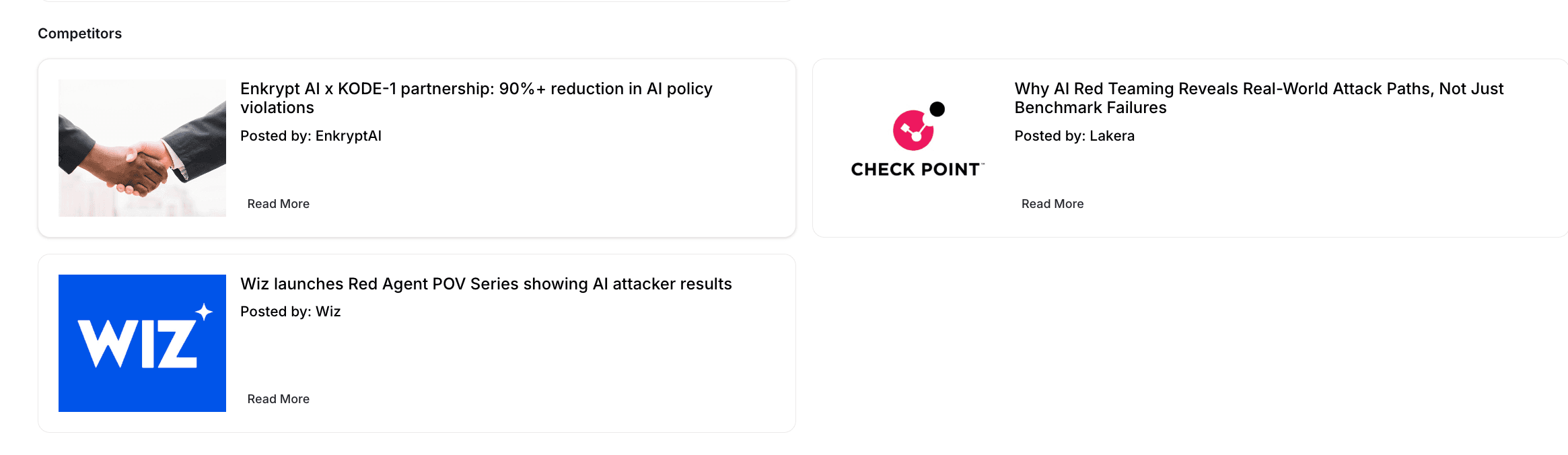
How this is used: A competitor puts out an idea that earned wage access is old news and AI agents are what's next. If you don't catch it and respond, that idea quietly becomes how buyers think. A few weeks later your sales team is on calls with prospects who already believe the competitor's version of the story, and your reps are stuck explaining why you still matter. But if you catch these the week they go out, you can answer while people are still making up their minds.
See how this signal gets gathered in the Research Agent release note.
Blogs: long-form relevant to your space
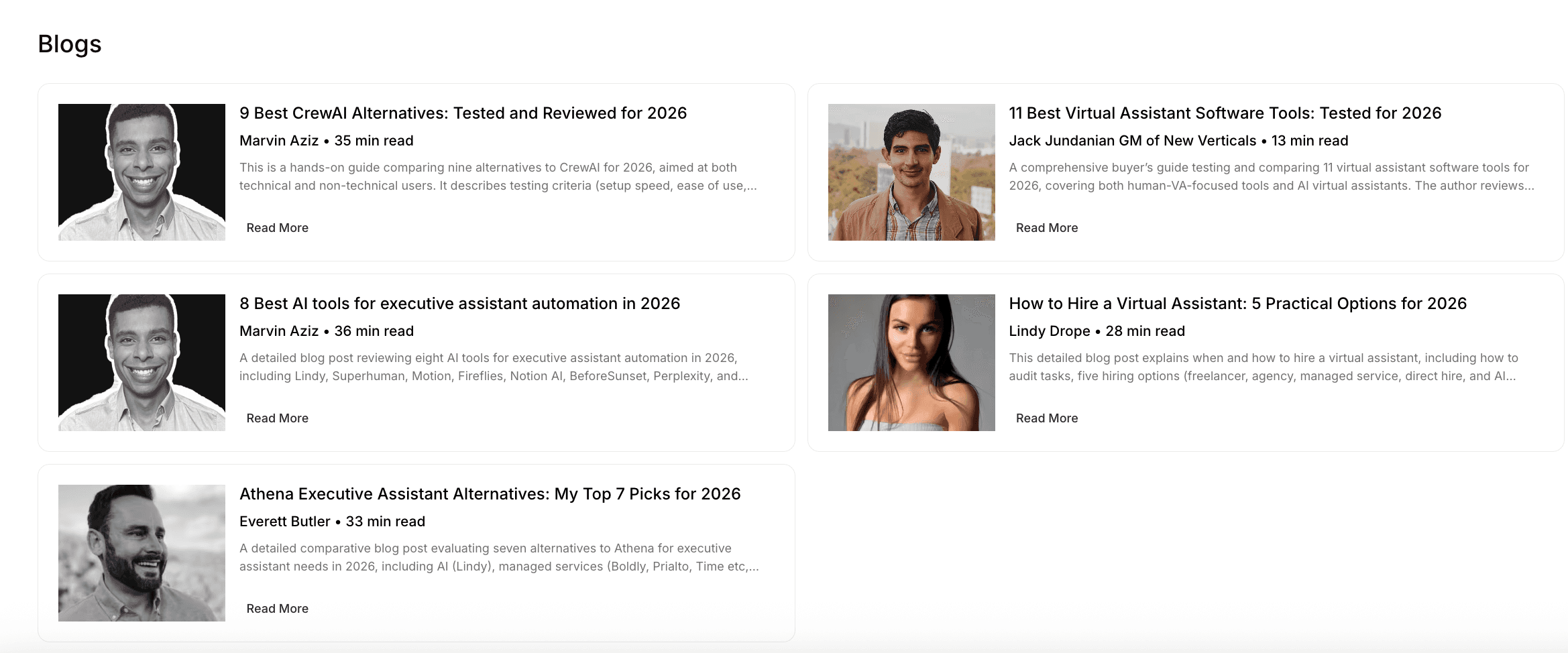
Blogs curates trending long-form from sites you've whitelisted in the campaign brief, ranked and summarized so your leadership can scan in seconds and form a view on where the category is heading.
How this is used: You scan the ranked summaries, send one piece to the team channel, and skip the rest.
Use cases for Weekly Marketing Research Report
Research agent doesn’t just pick up signals from external sources. It also picks up internal context from Slack and call recordings and uploaded files. This gives more room for flexibility on the type of reports it can generate.
Marketing team use cases
Thought leadership engine
The report surfaces the debates and influencer takes worth a point of view, so your founder or exec drafts a post grounded in the research while the topic is still live.
Upskilling newsletter
Build a weekly report that pulls deep-research articles on AI studies and industry reports from sources you whitelist, then send it to your team as a standing internal newsletter. Set the sources once, and the newsletter keeps your team current every week after.
Customer newsletter
Rank the week's best industry research for your ICP and send it to your list, or use it as the idea engine behind it.
Sales enablement digest
The week's competitor moves and analyst takes, ranked for your buyer, go to your sales channel so reps walk into calls informed.
SEO and AEO topic discovery
The report surfaces the emerging questions and terms your buyers are discussing, so your content targets demand that's forming now.
Content calendar
The week’s highest-ranked signals can become your content calendar. Each signal arrives with a campaign, audience, messaging pillar, and source attached, so there's already enough context to decide what to create and why.
Industry use cases
Security vendors
Point it at threat advisories and competitor launches so your team ships content while a threat is still in the news.
Fintech and workforce platforms
Track partner moves and regulatory shifts so your messaging answers what the market is reacting to.
Developer tools
Surface what developer influencers and rival products posted this week, so your founder's LinkedIn speaks to what the community is already debating.
Keep your content grounded in research
Without grounding, AI content drifts toward confident, unsourced claims. It also drifts away from what your market is talking about this week. The report keeps both in check: every signal is current, and every one cites a source you approved.
Already on Magi? Your home feed has this week's report. Or click on Research on the side bar.
New to Magi? Book a demo to see it live.
Frequently asked questions
What is a marketing research report?
How do you keep AI-generated content accurate and free of hallucinations?
How do marketers track what competitors are publishing?
How can marketing teams use AI for market research?
What should I look for in an AI tool for marketing research?